Need a login to try in Televizo? Get a free 24-hour test with Xtream details, an M3U link and a guide link. No credit card. See plans from $14/month →
Last updated: November 8, 2026
1. What Is Televizo?
Televizo is an IPTV player app. It plays the channels, movies and series that your IPTV provider supplies, and it shows them in a list or grid with a TV guide. The Google Play listing says it plainly: the app is only a media player and does not provide any content. In the Play snippet on November 8, 2026, the app showed a 3.8 rating from 18,067 votes.
That means the app alone shows nothing. You need a login from a provider: either Xtream Codes (a server address, a username and a password) or an M3U playlist link. If those terms are new, read our guides on Xtream Codes and the M3U playlist, or start with what IPTV is.
Televizo is an Android app. It runs on Android phones and tablets, on Android TV and Google TV, and on Amazon Fire TV. A forum thread about the app says it is only supported on Android devices, which matters for the next sections.
2. Free vs Premium
The app is free to install. A paid Premium upgrade is optional. The table shows what each side covers, based on a TROYPOINT guide published August 9, 2023, so check the app for the current list:
| Feature | Free | Premium |
|---|---|---|
| Playlists (M3U and Xtream Codes) | Yes, several playlists | Yes |
| List or grid view, built-in guide (EPG), favorites | Yes | Yes |
| Hardware acceleration, sleep timer, subtitles | Yes | Yes |
| Ads | Shown | Removed |
| Parental controls, auto full-screen, backup and restore, auto frame rate | No | Yes |
Source and date: TROYPOINT, August 9, 2023, and Google’s AI Overview for “televizo” on November 8, 2026. Both gave Premium at $1.99 a month or $11.99 a year. Limits: prices and the feature split can change, and we did not test Premium. Check the price in Google Play before you pay.
3. Which Devices Can Run It?
Use this table before you install anything. It follows what our sources say about the app and what we already know about each device:
| Your device | Fits? | What to do |
|---|---|---|
| Android phone or tablet | Yes, it is an Android app | Install it from Google Play |
| Android TV, Google TV, NVIDIA Shield | Yes | Install it from Google Play on the TV. See IPTV on Android TV |
| Fire TV Stick, Fire TV Cube | Yes, installed with Downloader | See the install steps in section 4 and our IPTV on Firestick guide |
| Samsung smart TV | Not as an Android app: Samsung TVs do not run Android | Check the TV’s app store first, or use IBO Player. See IBO Player and IPTV on Smart TV |
| LG smart TV (webOS) | Not as an Android app: LG TVs do not run Android | Check the TV’s app store first, or use IBO Player. See IPTV on Smart TV |
| Roku | Not as an Android app: Roku has its own system | See IPTV on Roku |
| iPhone, iPad, Apple TV | No, it is not an Android device | See IPTV on iPhone |
| Windows PC | Our sources describe only an Android app | See IPTV on Windows |
One YouTube video in the results claims to cover Samsung and LG TVs. We did not verify it, so check your TV’s app store before you rely on it.
If you are shopping for hardware, a Fire TV Stick or a Google TV streamer plugged into the HDMI port gives any TV an Android-based player. Our best IPTV box guide compares them. Section 10 shows why this table matters: most Americans who search for Televizo name a TV brand that does not run the app.
4. How to Install It
On Android TV, Google TV and Android phones
- Open the Google Play Store on the device.
- Search for “Televizo – IPTV player”. You can also open the Televizo listing on Google Play and send it to your device.
- Select Install, then open the app.
On a Fire TV Stick
One guide, published by TROYPOINT on August 9, 2023, installed it with the free Downloader app. The steps were: install Downloader, allow unknown apps for Downloader in the Fire TV settings, open Downloader and type the address televizo.net, choose the Amazon APK, wait for the download and select Install. Confirm the address on the developer’s Google Play listing before you type it, and never install a copy from an unknown site.
Our IPTV on Firestick guide explains the Fire TV settings in more detail.
Want a login to try in Televizo? Request the free 24-hour test by form.
5. How to Add Xtream Codes or M3U to Televizo
The steps below follow the TROYPOINT guide and Google’s AI Overview. Menu names can change between versions.
- Open the app. If it shows a first-run screen, continue past it.
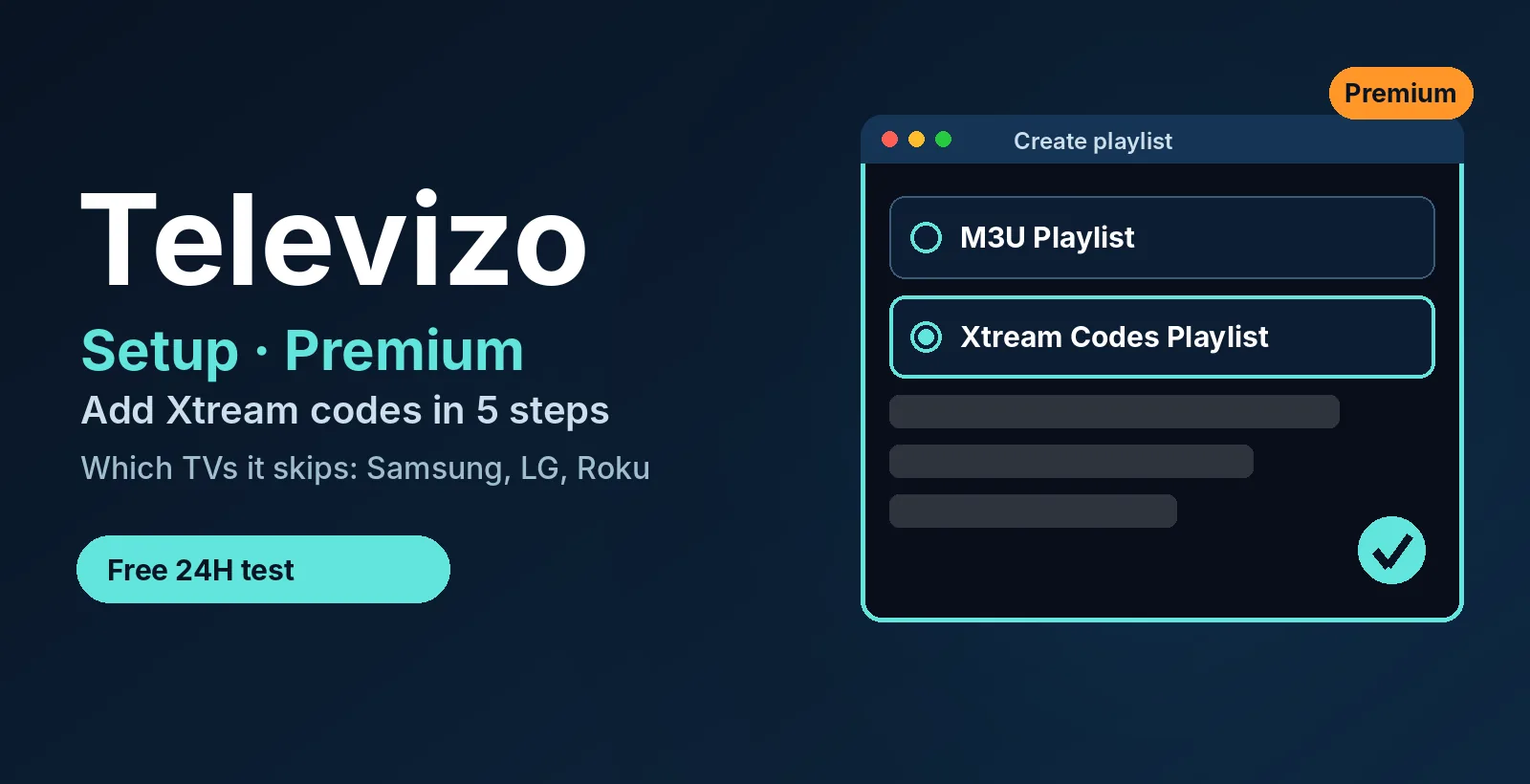
- Select Create playlist.
- Choose Xtream Codes Playlist (recommended) or M3U Playlist, to match the details your provider sent.
- Enter the details exactly as supplied. For Xtream Codes, that is the server address, the username and the password. For M3U, it is the link.
- Confirm with the checkmark in the top right corner. Televizo loads the channel list and the guide.
| What you receive | Where it goes in Televizo | Needed for |
|---|---|---|
| Server address, such as http://server:port | The server address field of the Xtream Codes playlist | Xtream Codes |
| Username | The username field | Xtream Codes |
| Password | The password field | Xtream Codes |
| M3U link | The link field of the M3U playlist | M3U |
| Guide (EPG) link | The guide setting, if the app does not load it by itself | Mainly M3U |
Source and date: TROYPOINT, August 9, 2023, and Google’s AI Overview, November 8, 2026. Limits: we did not run these steps on a device for this guide.
Use Xtream Codes whenever you have it: it is one login, and the app can usually load the guide from the same server. If the login is refused, the same causes as in our failed to authorize guide usually apply: a typo, a missing port or an expired line.
6. Where Do You Get a Televizo Code or Link?
People search for a “Televizo code” or link, but the app does not issue either one. The Play listing says it does not provide content. The server address, username, password or M3U link come from your IPTV provider.
With us, the free 24-hour trial includes Xtream details, an M3U link and a guide link, with no credit card. Paid plans start at $14 a month on our IPTV plans page. Test it in Televizo first, then decide.
Do not take codes from public lists. A code from a list may belong to someone else’s account and can stop working without warning. If you still want to look at public playlists, read our public IPTV playlist guide and its 5-step safety check first.
7. How to Activate Televizo Premium
Premium is a separate purchase from your IPTV subscription. It is sold through Google Play. Here is what our sources confirm and what they do not:
- Buy it in Google Play. TROYPOINT says you must install the app from Google Play to buy Premium. A forum post also says Premium is bought on a smartphone.
- Use the Companion app. The Google Play listing for Televizo Companion says it lets you manage your Televizo account, delete your devices and edit their names.
- Check it on the TV. After buying, open the app on your TV and see whether the ads are gone. Our sources do not describe the exact steps for linking a TV.
Limits: we could not open the Companion listing in full, and no source we read gives the exact menu path on a TV. One forum user on Fire TV reported Premium active but no account visible to link. If Premium does not show on your TV, ask the developer’s support or the r/Televizo community, and do not pay twice.
8. Not Working: Quick Fixes
These are general fixes that apply to most IPTV players. We did not test them in Televizo.
| Problem | Likely cause | What to try |
|---|---|---|
| The playlist will not save | A typo, a missing http:// or port, or a wrong password | Re-enter the details exactly. Usernames and passwords are case-sensitive |
| Channels load but will not play | The line expired, or too many screens are in use | Check your expiry date and close the app on other devices |
| The channel list looks old | The playlist was not refreshed | Update the playlist from the playlist settings |
| No TV guide | The guide link is missing, mainly with M3U | Add the guide (EPG) link from your provider |
| Buffering | Weak Wi-Fi or a busy network | Use Ethernet or 5 GHz Wi-Fi, then restart the device |
Still stuck? Send our support team a photo of the screen and your device model. We answer on WhatsApp 24/7.
9. Televizo vs TiviMate
Both are player apps for Android-based devices, and both accept Xtream Codes and M3U. They do not include channels, so the choice is about layout and features. TiviMate is built around a cable-style guide, and its Premium adds recording and multi-view. Televizo itself is a lighter player with a free tier that already supports several playlists. Try both with the same login, because our free trial works in either. For a wider ranking, see our best IPTV player apps guide.
10. What Google’s Top Results Leave Out: Our SERP Check and Search Math
We ran two small checks. The first shows what Google shows for “televizo” today. The second shows which devices Americans actually pair with it in their searches.
Check 1: what Google shows for “televizo”
Method: we ran a live Google search in the USA (desktop, English) on November 8, 2026 and sorted every element on page one by type, using each result’s title, snippet and domain.
| Result type | Count | What we saw |
|---|---|---|
| AI Overview | 1 | Summarizes the app, Free vs Premium and four setup steps, citing Uptodown, TROYPOINT, Download.it, TV.TEAM and YouTube |
| Video pack | 2 | YouTube: one on Smart TVs (Samsung, LG, Android TV), one on Google TV and Android |
| Google Play pages | 2 | The developer page and the app listing |
| APK download pages | 2 | Uptodown and Softonic |
| Setup guides | 2 | TV.TEAM wiki and pro-tv.biz |
| Site named after the app | 1 | televizoplayer.com. We did not verify who runs it |
| YouTube result | 1 | How to add playlists on a Smart TV |
| Title or snippet about Premium activation | 0 | None of the organic results |
People also ask showed four questions, including whether the app is free and how to download it on a Firestick. Related searches included PC, iOS and free playlists.
What stands out: the organic results are store pages, APK sites and short setup guides. None of their titles or snippets explains Premium, and only one video title names Samsung and LG. Our guide covers both.
Limits: we judged by title, snippet and domain and did not open each page, so a result may cover more than its snippet shows. Results change daily and differ by location.
Check 2: which devices Americans search for
Method: we took the monthly US search volumes of seven “televizo + device” searches from Google Ads data through DataForSEO, using the latest month available for each (August or September 2026).
| Search: televizo + | Monthly US searches | Month | Is the device Android-based? |
|---|---|---|---|
| samsung | 6,600 | Sep 2026 | No |
| roku | 5,400 | Aug 2026 | No |
| lg webos | 4,400 | Aug 2026 | No |
| tizen (Samsung’s system) | 2,400 | Sep 2026 | No |
| fire stick | 1,300 | Sep 2026 | Yes |
| pc | 390 | Sep 2026 | No |
| android | 320 | Sep 2026 | Yes |
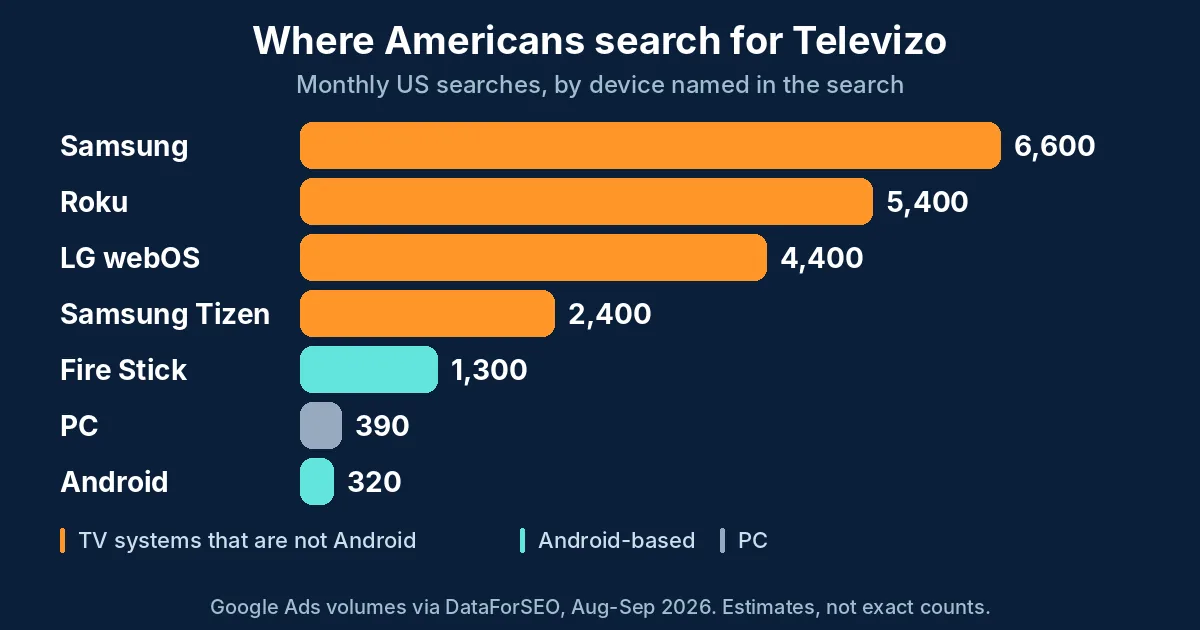
The finding: searches that name Samsung, Roku or LG webOS add up to about 16,400 a month, while searches that name Fire Stick or Android add up to about 1,620. That is roughly ten to one in favor of devices that do not run Android.
Source and date: DataForSEO, Google Ads volumes for the USA, checked on November 8, 2026. Limits: these are estimates, not exact counts. The months differ. “Samsung” and “Tizen” may overlap, so we left Tizen out of the 16,400 total. A search that names a TV does not prove the person wants the app on it.
11. How We Prepared This Guide
- Questions: the headings follow Google’s People Also Ask questions and related searches, collected on November 8, 2026.
- App facts: from the Google Play listing snippet, the TROYPOINT guide of August 9, 2023, a forum thread about the app and Google’s AI Overview. We read the TROYPOINT guide and a forum thread.
- Premium: the price and feature list come from TROYPOINT and the AI Overview. We did not buy or test Premium.
- Setup steps: taken from those sources. We did not run them on a device.
- Search data: Google Ads volumes through DataForSEO for the USA.
- Our own data: the trial contents and plan prices come from our plans page.
- Updates: the date at the top shows when this guide was last reviewed. Menus and prices change, so confirm them in the app.
12. Frequently Asked Questions
What is Televizo?
Televizo is a free IPTV player app for Android phones, Android TV and Fire TV. It does not provide channels: you create a playlist in the app and enter the Xtream Codes or M3U details from your IPTV provider.
Is Televizo free?
Yes, the app is free to install and use. An optional Premium upgrade removes ads and adds extras such as parental controls. A guide from August 2023 listed Premium at $1.99 a month or $11.99 a year, so check the current price in Google Play.
Where do I get a Televizo code or link?
Televizo has no code of its own. Your IPTV provider gives you the details: a server address, username and password for Xtream Codes, or an M3U link. Our free 24-hour trial includes both, with no credit card. Do not use codes from public lists.
Does Televizo work on Samsung, LG or Roku TVs?
Televizo is an Android app, and Samsung, LG and Roku TVs do not run Android. Check your TV’s app store first. If Televizo is not listed, use a player built for your TV, such as IBO Player on Samsung and LG, or a Fire TV Stick plugged into the TV.
How do I add Xtream Codes to Televizo?
Open Televizo, choose Create playlist, pick Xtream Codes Playlist, and enter the server address, username and password exactly as your provider sent them. Then confirm with the checkmark in the top right corner.
How do I activate Televizo Premium?
Buy Premium in Google Play on an Android phone or tablet, because the app must come from Google Play to be upgraded. Then use the Televizo Companion app to manage your account and devices. We could not confirm the exact menu on a TV, so ask the developer’s support if it does not show.
13. Conclusion
Televizo is a free Android player: install it, create a playlist, choose Xtream Codes or M3U and enter the details from your provider. Premium is optional and is bought in Google Play. If you own a Samsung, LG or Roku TV, check your TV’s app store first, because the app is built for Android devices. Want a login to try? Request the free 24-hour trial, test it in Televizo, then pick one of our IPTV plans if you like it.
Ready to test the app with a real login? Ask for your free 24-hour trial on WhatsApp.
Start your free 24h trial
No credit card. We reply with your trial login.