Want IPTV you can test on your own home connection? Get a free 24-hour test login with an M3U link, Xtream details and a guide link. No credit card. See plans from $14/month →
Last updated: November 9, 2026
1. Provider TV Service or IPTV App? Two Meanings of “ISP IPTV”
When people talk about IPTV and their internet provider, they usually mean one of two things. Some large phone and internet companies have sold their own TV service built on IPTV technology, delivered over their managed network with their own set-top box. Others already use an IPTV app and find that it fails or buffers only on their home internet.
| Question | Provider’s own IPTV TV service | IPTV app over your home internet |
|---|---|---|
| What it is | A TV package from your phone or internet company, built on IPTV technology and delivered over its managed network | A separate IPTV service you watch through an app such as IPTV Smarters Pro, over any internet connection |
| Who supplies the equipment | The provider, usually a rented box | You: a Firestick, Smart TV, phone or box, plus a player app |
| Can you still sign up? | It depends on the company. Several have stopped selling new TV packages of this kind, so check with your provider | Yes, with the service you choose. Ask for a free trial first (ours is 24 hours) |
| Who fixes problems | Your internet provider’s support | The IPTV service. Ours answers on WhatsApp |
| Why it may fail at home | Your provider’s support covers it | The stream travels over your home internet, so your gateway, Wi-Fi and security filters all apply |
New to the term? Our guide to what IPTV is explains the basics. The rest of this guide focuses on the second case: an IPTV app that fails on your home internet.
2. Is Your Internet Provider Blocking IPTV? What Is Documented and What Users Report
We found no major US internet provider that publishes a rule blocking IPTV as a category. What many providers do offer is a network security feature built into the home gateway or its app. It blocks domains and traffic it flags as threats, such as malware, phishing or fraud, and it usually keeps a list of what it blocked.
| Topic | What to expect | Where to look |
|---|---|---|
| What the filter does | Blocks domains and traffic it rates as a threat, for every device on your home network | Your gateway’s app or its web settings page |
| Blocked-activity list | Most of these features keep a log of blocked threats with the time and the domain | Usually under Security, Protection or Activity in the gateway app |
| Gateway model | Advanced security features are often only available on newer gateway models | Your provider’s help pages for your gateway |
| How to allow a domain | Some apps let you allow one blocked site; others do not document it | The gateway app, or your provider’s support |
Limits: settings, names and menus differ by provider and gateway model. This table describes the common pattern, not a specific product.
User reports fill the gap, but they are reports, not provider statements. On public forums, users describe home security filters blocking IPTV and other streaming apps, and say that allowing the site and resetting the app helped. Others report buffering on fiber at home while the same service works on another network or on mobile data, sometimes after their gateway was replaced.
The pattern is worth testing, not assuming. The next section shows how.
3. How Can You Tell If Your ISP Is Blocking IPTV? The 3-Test Check
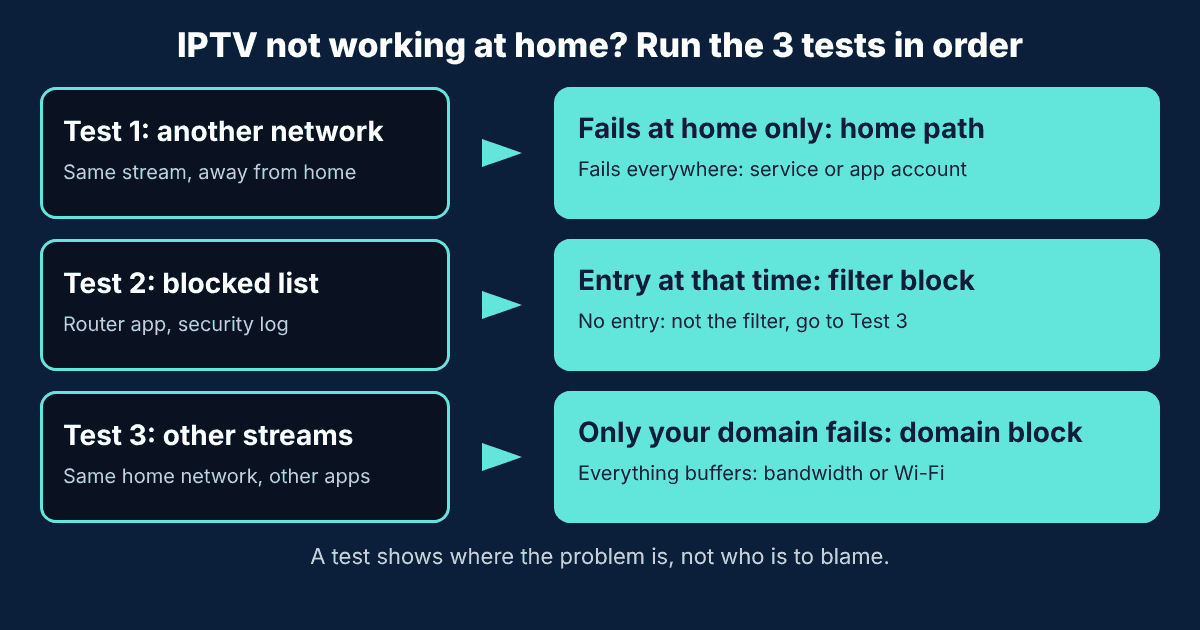
When IPTV fails at home, many guides tell you to switch off security or install a VPN straight away. A faster first step is to find where the failure sits. Pick one channel that fails and run these tests in order:
- Test 1: same stream, another network. Play the failing channel from a network that is not your home gateway, such as a phone on mobile data or a friend’s Wi-Fi. Use the same app and login. If it works there but fails at home, the problem sits on your home path. If it fails everywhere, the problem is the service, the login or the app.
- Test 2: the blocked-activity list. Note the time of a failed attempt. Open your gateway’s app or settings page and look for the security or blocked-threats activity. Look for an entry at that time. If your gateway has no such list, skip to Test 3.
- Test 3: other streams on the same home network. Play something else on the same connection: a public stream in VLC (see our public IPTV playlist guide) and a normal video app. If only your IPTV service’s streams fail, the block is likely on that domain. If everything buffers, suspect Wi-Fi or bandwidth, and retest on a cable.
Now match what you saw to a likely cause:
| What you saw | Most likely cause | Next step |
|---|---|---|
| Works away from home, fails at home, and the blocked-activity list shows an entry at that time | Your home security filter flagged the domain | Confirm the domain with your IPTV service, then see section 5 |
| Works away from home, fails at home, and there is no blocked entry | Another home-path issue: gateway setting, DNS or a route problem | Restart the gateway and the app, try a cable, then contact your internet provider with your test notes |
| Fails on every network | Service, login or app problem | Check your login, then read IPTV not working: 7 fixes and ask your IPTV service |
| Works everywhere but buffers at peak hours at home | Congestion or throttling. One test cannot tell them apart | Repeat at different times, write down results, see section 6 |
| Only one channel fails | A dead or moved stream, not your network | Try other channels and refresh the playlist |
Limits: this check shows where the failure sits. It cannot prove who is responsible.
Want a clean test of your home connection? Run Test 3 with a real login for 24 hours.
4. IPTV Not Working on Home Internet: Symptom, Cause and Fix
Use this table after the 3-test check. It lists the most common symptoms and the first fix to try:
| Symptom | Likely cause | First fix |
|---|---|---|
| The app says login failed or not authorized | Wrong or expired details, or the service changed its server | Re-enter the details from your IPTV service. See IPTV Smarters failed to authorize |
| The playlist loads but channels will not play | A moved or blocked domain, or dead links | Run the 3-test check. See IPTV M3U not working |
| “Cannot open URL” only on home Wi-Fi | A home-path problem, such as a filter or gateway setting | Run Test 1 and Test 2 |
| Buffering only at night on home internet | Peak-hour congestion or a weak Wi-Fi signal | Test on a cable and on another network, and note the times |
| Works on the phone but not on the TV box | The device or the app, not your internet provider | Restart the box and update the app. See how to install IPTV on Firestick |
| Channels worked yesterday, gone today | The service changed a domain or a stream | Ask your IPTV service for the current server address. Do not use random “updated” links |
For a wider list of fixes, read IPTV not working: 7 fixes.
5. Should You Turn Off Your Router’s Security Filter for IPTV?
Not as a first step. The gateway’s security filter protects every device on your network, so switching it off to fix one stream is a bigger trade than it looks. Go through this list in order instead:
- Check the blocked-activity list. If nothing was blocked at the time of the failure, the filter is not your problem.
- Check the domain. A block tells you the filter flagged something. It does not tell you why. Confirm with your IPTV service’s own support channel that the domain is its real, current one. Clone sites exist, so do not trust a search result for this.
- Look for a narrow option. Some gateway apps let you allow a single blocked site. Check what yours offers.
- Allow only what you trust. If you allow a domain, allow that one domain and nothing else.
- Ask your internet provider. If there is no option, contact its support with the time of the failure and the domain.
6. Does Your Internet Provider Throttle IPTV?
One test cannot prove throttling. What you can do is collect evidence. Play the same stream on your home connection at different times of day, and on another network. If it plays well during the day and on another network but struggles every evening at home, that pattern is worth reporting to your internet provider with your dates and times.
A VPN comparison is a common test, but it adds another variable. The same-stream, other-network test in section 3 is simpler and tells you more about your own line.
7. Is Watching IPTV Legal in the USA?
IPTV is a delivery technology, and using it is legal. The question is whether a service has the rights for the channels it offers. A block by your home security filter is a security decision. It does not tell you whether a service is licensed, and it does not prove a service is safe either. Our IPTV legality guide explains what to check before you subscribe. This is general information, not legal advice.
8. Provider TV or an IPTV App: Which Fits You?
Go through this list in order:
- You have a TV package from your internet provider and it works: keep it, and contact your provider for any problem.
- You want TV through an app on your own devices: pick an IPTV service and test it over your own home connection first. No service can promise a stream will get past every home filter, so a trial is the honest check.
- You only want free news and regional channels: a public playlist may be enough. See our public IPTV playlist guide.
- You are replacing a cable box: compare the costs in cable vs streaming vs IPTV.
Our free 24-hour trial gives you a real login, so you can run Test 3 on your own connection before you pay.
9. How We Prepared This Guide
- Questions: the headings follow real US Google searches about IPTV being blocked by internet providers, collected in November 2026.
- Security filters: based on the help pages that large US internet providers publish for their gateway security features, opened in November 2026. Names and menus differ, so we describe the common pattern.
- User reports: public forum threads from home internet users. They are reports, not facts about every customer.
- What we did not do: we cannot say how many customers see blocks on any given network.
- Our own data: prices and trial details come from our plans page.
- Updates: the date at the top shows when this guide was last reviewed.
10. Frequently Asked Questions
Is my internet provider blocking IPTV?
Most internet providers do not publish a rule that blocks IPTV as a category. Many home gateways include a security filter that blocks domains it flags as threats, and some users report that such filters have blocked their IPTV apps. Run the 3-test check in this guide to see whether it is happening on your connection.
How can I tell if my ISP is blocking a stream?
Play the same channel with the same login on another network, such as a phone on mobile data. If it works there but fails at home, check the security or blocked-threats list in your gateway app, then test other streams on your home network.
Should I turn off my router’s security filter to watch IPTV?
Not as a first step. Check the blocked-activity list first. Turning off network security removes protection for every device in your home. If one domain you trust is blocked, allow only that domain, or ask your internet provider’s support.
Does my internet provider throttle IPTV?
One test cannot prove throttling. Play the same stream at different times of day and on another network. If it only struggles in the evening on your home connection, write down the times and share them with your provider’s support.
What is the difference between a provider’s own IPTV TV service and an IPTV app?
Some phone and internet companies have run TV services built on IPTV technology over their own managed network, with their own box and support. An IPTV app is a separate service you watch on your own device over any internet connection.
Is watching IPTV legal in the USA?
IPTV is a delivery technology and is legal. The question is whether a service has the rights for the channels it offers. Our IPTV legality guide explains what to check. This is general information, not legal advice.
11. Conclusion
If an IPTV app fails only on your home internet, do not start by switching off security. Run the 3-test check, look at your gateway’s blocked-activity list and confirm the domain with your IPTV service before you change any setting. To see how a service behaves on your own line, start the free 24-hour trial and compare the plans from $14/month.
Ready to test IPTV on your home connection? Message us for your free 24-hour trial.
Start your free 24h trial
No credit card. We reply with your trial login.