IPTV M3U not working? If a playlist fails to load, channels freeze, or the TV guide is blank, the problem may be the playlist URL, an expired login, the player app, or your home network. This 2026 guide walks US viewers through seven practical fixes before they replace their device or pay for another subscription.
Quick answer: Check the complete M3U URL, confirm that your account is active, update the app, test the playlist in a second compatible player, check EPG settings, test your internet connection, and contact the authorized provider if the stream still fails.
Why is IPTV M3U not working?
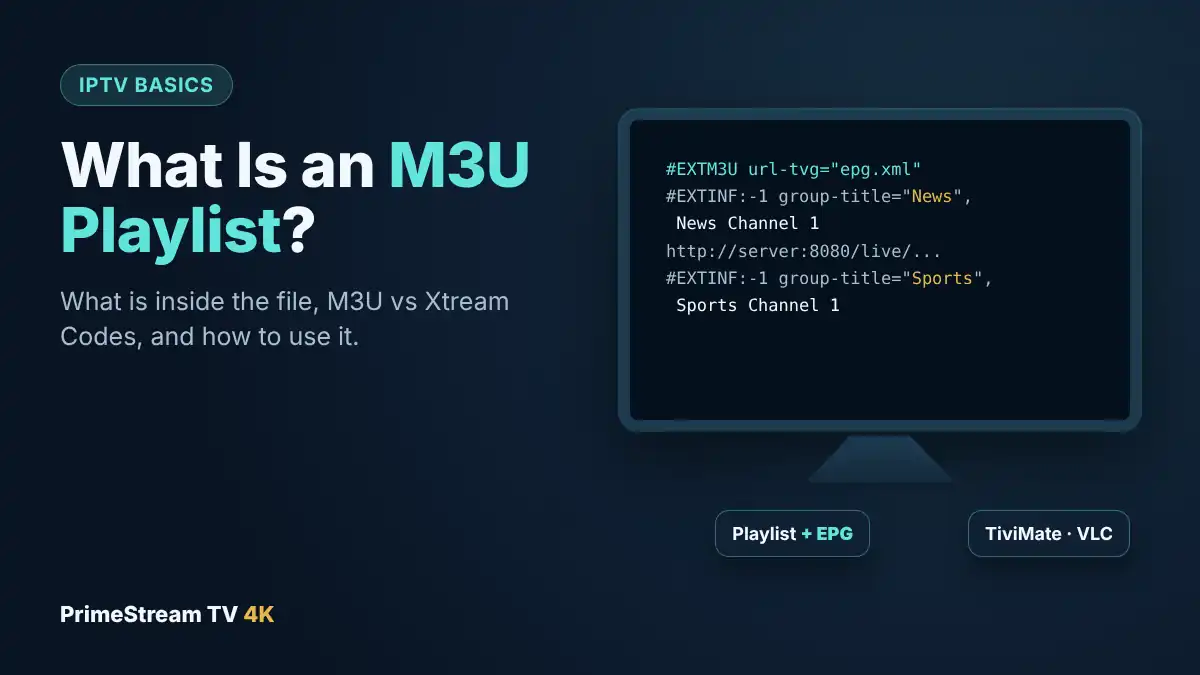
An M3U playlist is a text-based index of media addresses. It does not guarantee that the video sources behind those addresses are available. A playlist can be valid while an individual stream is offline, region-restricted, unauthorized, or no longer supported. The first step is to determine whether the error affects the entire playlist or only a few entries.
For a primer on playlist structure, see our M3U playlist guide. If your app will not authenticate at all, compare the symptoms with our IPTV Smarters authorization fixes.
IPTV M3U Not Working: 7 Fixes to Try in Order
1. Check the full playlist URL and format
Copy the entire URL from the provider rather than typing it by hand. Remove spaces added during copying, and make sure the link begins with the correct protocol. If you received a local file, verify that the player supports .m3u or .m3u8. Do not paste private playlist links into public URL-checking services.
2. Verify the subscription or trial is active
A playlist can stop loading when an authorized trial expires or when the provider changes access credentials. Review your account status and the number of simultaneous streams permitted. If your subscription uses Xtream Codes, confirm the server address, username, and password separately.
3. Restart and update your IPTV player
Close the app fully and reopen it. Check for updates through the device’s official app store. If the app offers a playlist refresh, run it before deleting any saved settings. Some older smart TVs no longer support recent player versions; a compatible external streaming device may be an alternative.
4. Try the M3U playlist in another trusted player
Testing the same authorized source in a second compatible player, such as VLC (see IPTV on VLC), helps isolate the cause. If it works in one app but not another, the problem is likely app compatibility or configuration. Read our IPTV player comparison to understand the differences between common options, or see IPTV on Kodi if you prefer a full media center.
5. Fix missing channels and the EPG TV guide
If channels appear but program titles are blank, check whether your provider supplies an EPG feed. Refresh the guide and confirm the time zone. US households may need to account for Eastern, Central, Mountain, or Pacific time. An EPG mismatch usually does not mean the stream itself is broken.
6. Test Wi-Fi, Ethernet, and streaming quality
Run a normal internet speed test, then check whether other legitimate video services work on the same device. Move closer to the router or test a wired Ethernet connection. High bandwidth alone is not enough: packet loss, Wi-Fi interference, and network congestion can also cause buffering.
If you are troubleshooting UHD playback, our IPTV 4K requirements guide explains device decoding, display, and network considerations.
7. Contact the authorized provider with useful details
Record the exact error message, device model, app version, approximate time, and whether all channels fail or just one. Do not send passwords or personal playlist URLs in public forums. A legitimate provider should be able to confirm whether the source is online and whether your account is active.
IPTV M3U not working on Fire TV Stick
On Fire TV devices, first check whether the selected app supports your playlist format. Restart the Fire TV Stick, install any pending system and app updates, and verify that the device has enough free storage. Avoid installing unknown APK files from untrusted websites. For device-specific steps, see IPTV on Firestick: setup guide.
IPTV M3U not working on Samsung or LG Smart TV
Samsung Tizen and LG webOS do not run every Android IPTV player. Search your TV’s official app store for compatible players and check their instructions for uploading a playlist. If a player has been removed from the store, do not assume an unofficial replacement is safe. See our guides to IPTV Smarters on Samsung TV and IPTV on LG TV.
What if an IPTV M3U playlist loads but keeps buffering?
Separate the symptoms. A playlist that fails instantly may have a malformed URL or expired credentials. A playlist that opens but buffers during playback may have an overloaded source, network instability, or device decoding limits. Compare different authorized streams and repeat the test at the same time of day to identify patterns.
Do not rely on claims of a certain channel count or resolution alone. Ask for a clear description of the content license, supported devices, and subscription conditions before buying.
When should you request a 24-hour IPTV trial?
A trial can help you confirm that a particular player works with your TV and home internet connection. Test channel switching, audio sync, captions, the EPG, and evening playback. Keep notes so you can compare services fairly. Our 24-hour IPTV trial checklist covers the process in detail.
If you want to review the current options, visit the IPTV plans and pricing page. Make sure the service you select has the necessary rights to the programming you want to watch in the United States; IPTV is a delivery technology, not proof of content licensing. See our US IPTV legality guide for context.
IPTV M3U Troubleshooting FAQ
Why does my M3U playlist say “failed to load”?
The URL may be incomplete, the file format may be unsupported, the connection may be blocked, or access may have expired. Check each cause before replacing the app.
Why are channels missing from my IPTV M3U playlist?
Providers may change the available lineup, and apps may cache old categories. Refresh the playlist and ask the licensed provider whether the channels are included in your plan.
Does an M3U file work on Roku?
Roku does not necessarily support the same IPTV apps as Android TV. Review supported channels and compatible casting or playback options in our IPTV on Roku guide.
Is a free M3U playlist safe?
Safety depends on the source. Avoid anonymous files promising unauthorized premium channels, and never enter credentials on unfamiliar websites. Prefer official, licensed, or openly distributed streams.
Can I test my device before purchasing an IPTV plan?
Yes, a trial is a practical way to check device compatibility and stability before committing. You can request a 24-hour trial using the form on desktop or WhatsApp on mobile.
Final checklist: get your IPTV M3U working
Start with the URL and account status, then work outward to the app, EPG, device, and home network. If the same authorized playlist fails in multiple players on different networks, contact its provider rather than repeatedly reinstalling software. If the playlist is not the cause, our guide to other IPTV not working fixes covers wider problems. The best outcome is a stable, compatible, properly licensed service that you can verify before paying.