1. What IPTV 4K Really Means
IPTV 4K means watching live channels and on-demand movies in Ultra HD (2160p) over your internet connection. If you are new to the technology, our guide on what IPTV is explains the basics. The 4K part comes from three links in the chain working together: the content, the player and your screen.
Be realistic about the content. 4K is common in movies and series on demand and in selected sport and event channels, but many live channels are still HD. A “4K-ready” service means it can deliver 4K where the source exists, so availability varies by channel and title. That is why testing matters.
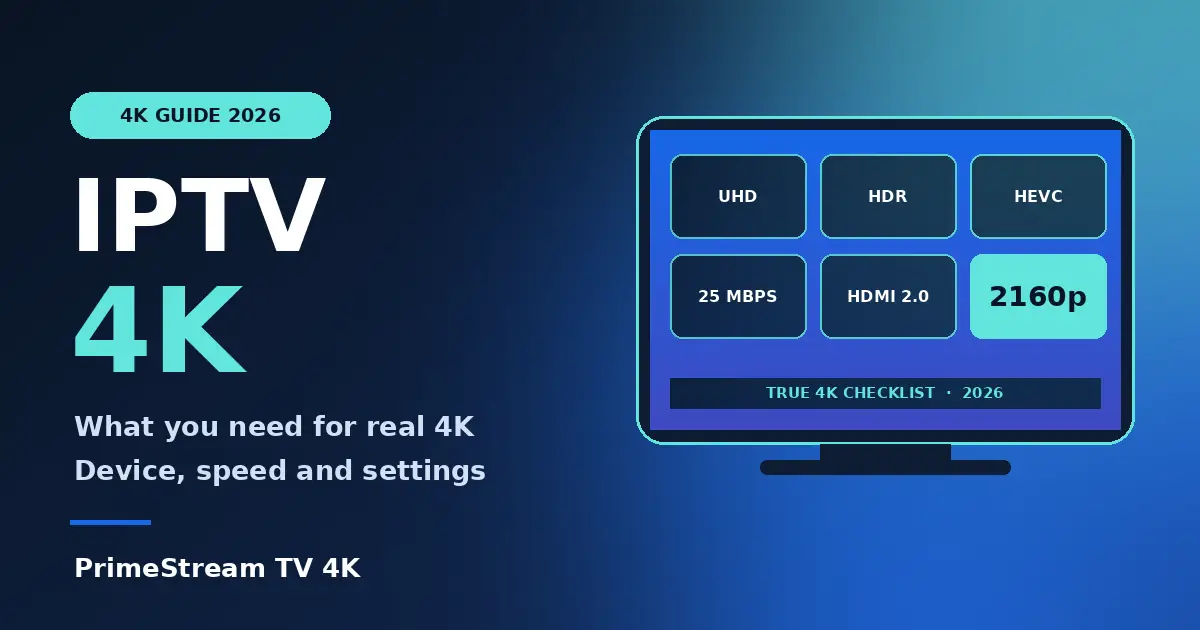
2. The 5 Requirements for IPTV 4K
| Requirement | What to have |
|---|---|
| 4K TV | A 3840 x 2160 screen, ideally with HDR support |
| HDMI input | An HDMI 2.0 port on the TV and a good-quality cable |
| Streaming device | A device that decodes HEVC (H.265) at 4K |
| Internet speed | About 25 Mbps or more for one 4K stream, more if others stream too |
| IPTV player | An up-to-date app with hardware decoding and 4K output |
If any link is weaker, the picture drops to HD. A 4K stream on an old HDMI 1.4 port or a Wi-Fi connection that fluctuates will buffer or step down in quality.
3. Best Devices for IPTV 4K
- Fire TV Stick 4K or 4K Max. The easiest and cheapest route. See our IPTV on Firestick guide and the TiviMate setup guide.
- Android TV and Google TV boxes. Good for people who want more storage and a wired Ethernet port. Compare options in our best IPTV box guide.
- 4K Smart TVs. Samsung and LG sets can run IPTV apps directly. Read IPTV on Smart TV and IPTV on LG TV.
- Roku. Support depends on the model and the app, so check IPTV on Roku first.
A budget HD-only stick may not decode 4K at all, so check the model before you blame the service. For a player that suits your device, see our best IPTV player comparison.
4. 6 Settings to Switch On
- Set the device output to 4K (2160p). Open the display settings on your streaming device and choose 4K or auto.
- Use the right HDMI port. Some TVs only enable the full 4K mode on one port, often labelled 4K or ARC.
- Turn on HDMI Ultra HD or enhanced mode. This is a TV setting that unlocks the full bandwidth on the port.
- Choose hardware decoding in the player. It reduces stutter on 4K streams.
- Use Ethernet. A wired link is more stable than Wi-Fi for 4K, especially at peak time.
- Update the app and the device. Updates fix decoding bugs.
5. How to Test That You Are Really Getting 4K
Do not trust a label alone. Use this quick test during your trial:
- Open a title or channel labelled 4K and check the player’s info overlay for 2160p or 3840 x 2160.
- Check the TV’s info button, which usually shows the incoming resolution.
- Watch for 30 minutes at evening peak time and note any buffering or drops to HD.
- Compare with an HD channel to confirm you can see the difference on your screen.
Our 24-hour IPTV free trial checklist shows how to run the whole test. When you are ready, request a free 24-hour trial and check 4K on your own TV.
6. IPTV 4K Not Working: Quick Fixes
- Picture is only HD. Check the device output, the HDMI port and whether the channel is truly 4K.
- Buffering. Switch to Ethernet, restart the router and close other streams.
- Stutter or green blocks. Turn on hardware decoding or try a different player.
- Black screen on 4K. Try another HDMI cable or port.
- Still stuck? Contact support with your TV, device and player name.
7. Frequently Asked Questions
What internet speed do I need for IPTV 4K?
About 25 Mbps or more for one 4K stream. If several devices are online at once, you need more headroom.
Which device is best for IPTV 4K?
A Fire TV Stick 4K or 4K Max, or a 4K Android TV box, are the most common choices. Check that the device decodes HEVC.
Are all IPTV channels in 4K?
No. 4K is mostly in movies, series and selected sport or event channels, while many live channels are HD. Availability varies by channel and title.
Do I need a special HDMI cable for IPTV 4K?
Use a certified high-speed HDMI cable and an HDMI 2.0 port on your TV. An old cable can cause black screens or HD-only output.
Can I watch IPTV 4K on Wi-Fi?
Yes if the signal is strong and stable, but Ethernet is more reliable at peak time.
How can I try IPTV 4K before paying?
Request a free 24-hour trial on one device and test 4K titles on your own TV before choosing a plan.
8. Conclusion
Real IPTV 4K comes from a chain: a 4K TV with HDMI 2.0, a device that decodes HEVC, about 25 Mbps of stable internet and a player set to 4K output. Test your own channels and titles instead of trusting labels. Start a free 24-hour trial, then compare plans and prices, read the IPTV subscription guide or see what a complete IPTV service includes. Sports fans can also check our IPTV for sports page.