Want IPTV on Kodi with links that work first time? Get a free 24-hour test login with an M3U link and an EPG link. No credit card. See plans from $14/month →
- Add-on: PVR IPTV Simple Client (free, from the official Kodi repository).
- You need: an M3U link, and an XMLTV link if you want a TV guide.
- Time: about 5 minutes once you have the links.
- Works on: Windows, Mac, Linux, Android TV, Fire TV and Android phones.
- Default buffer: 20 MB, which holds only 8 seconds of a 20 Mbps 4K stream.
1. Can You Use IPTV on Kodi?
Yes. IPTV on Kodi works through a free PVR add-on called IPTV Simple Client. It loads live channels from an M3U playlist and a program guide from an XMLTV file, then shows them in Kodi’s TV and Guide screens.
Kodi is a media player, not an IPTV service. It ships with no channels, so the playlist link comes from your provider. If you want the file basics first, read our M3U playlist guide. Compared with IPTV on VLC, Kodi gives you a real channel guide and a TV-style screen, which is why many people prefer it on a computer or a streaming box.
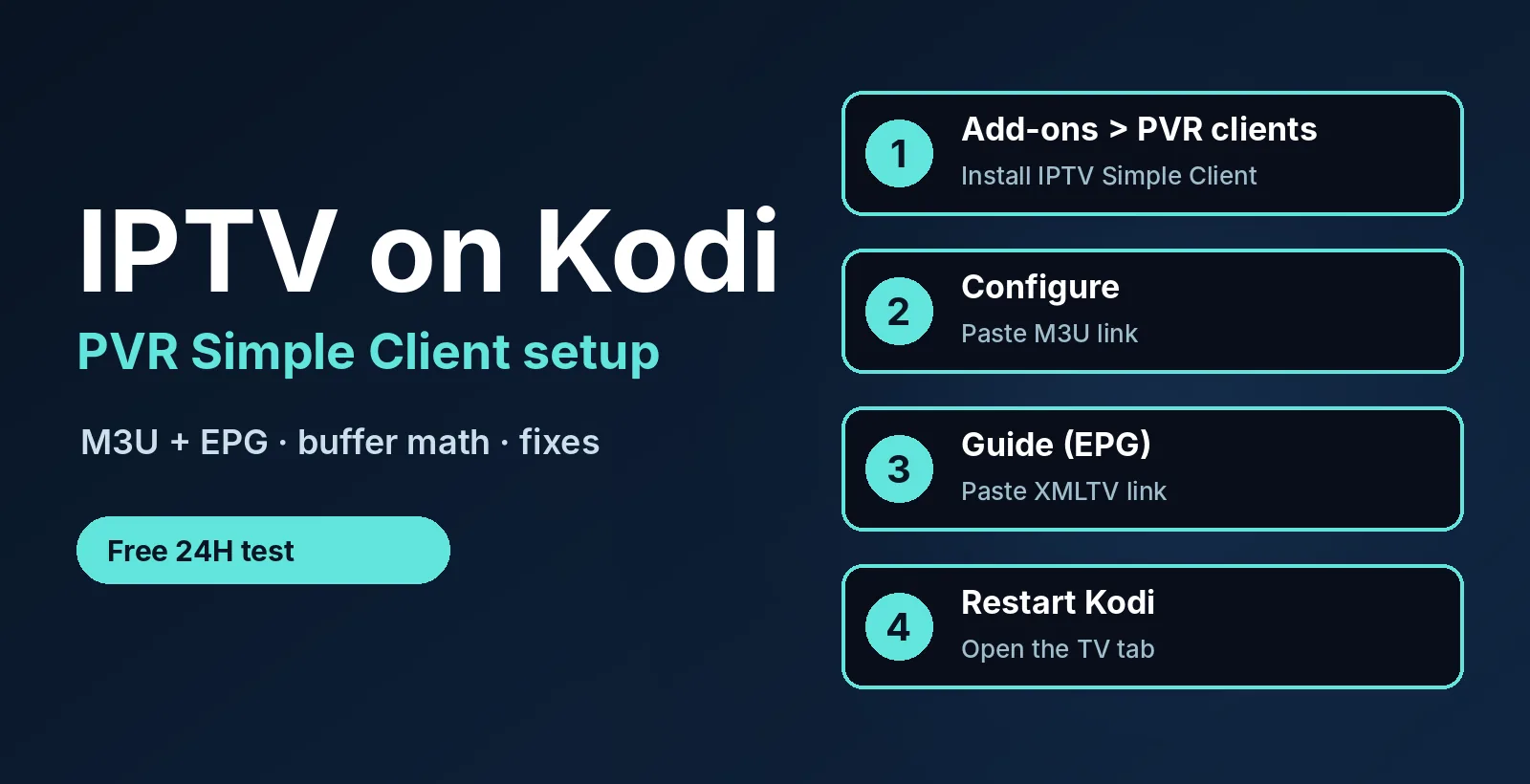
2. IPTV on Kodi in 4 Easy Steps
- Install the add-on. In Kodi go to Add-ons > Install from repository > PVR clients > PVR IPTV Simple Client and press Install.
- Open Configure. Select the add-on again, press Configure, and in the General section choose to load the playlist from a remote path (an internet address). Paste your M3U link.
- Add the guide. In the EPG settings, paste your XMLTV link. If your provider has no guide link, skip this step and the channels still play.
- Enable and restart. Make sure the add-on shows as enabled, restart Kodi, wait a minute for the channel list to load, then open TV on the home screen.
Menu names can differ slightly between Kodi versions, so follow the official PVR IPTV Simple Client page on the Kodi wiki if your screen looks different. If the list stays empty, jump to section 6.
Need an M3U and EPG link for IPTV on Kodi? Ask for a free 24-hour login and we send both links.
3. What Each Setting Does
| Setting | What to enter | If you skip it |
|---|---|---|
| M3U playlist URL | The playlist link from your provider | No channels at all |
| XMLTV URL | The guide link from your provider | Channels play, but the guide is empty |
| Cache M3U at local storage | Turn on for large playlists | Slower start-up each time |
| Channel groups | Optional, uses groups from the playlist | One long channel list |
The guide only lines up when the channel IDs in the XMLTV file match the IDs in the playlist. When a channel shows no schedule, that mismatch is the usual reason, not Kodi itself.
4. Turn an Xtream Login into an M3U Link
Many providers give Xtream Codes details (server, port, username, password) instead of a link. Kodi’s PVR add-on wants a playlist address, and most Xtream servers publish one built from the same details:
http://SERVER:PORT/get.php?username=USER&password=PASS&type=m3u_plus&output=ts
Replace SERVER, PORT, USER and PASS with your own values, then paste the result into the M3U field. Ask your provider for the exact link, because the pattern can differ between servers. Treat this link like a password: anyone who has it can use your login.
5. Buffer Math for IPTV on Kodi
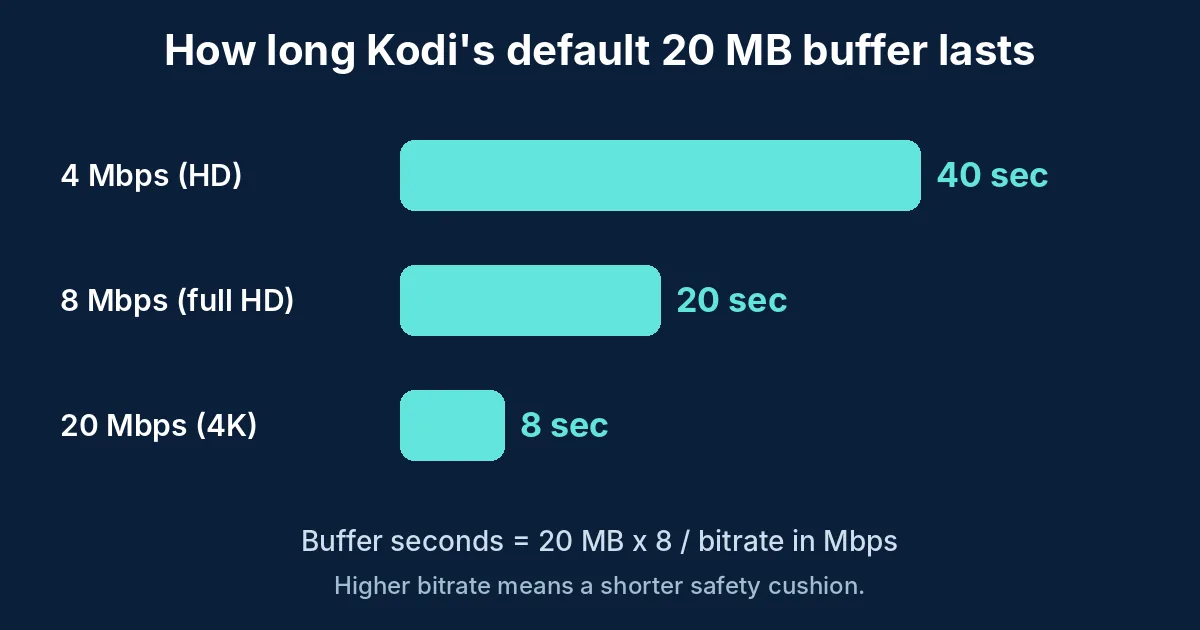
Most guides to IPTV on Kodi say “increase the cache” without numbers. Kodi’s memory cache is set in advancedsettings.xml, and the documented default is about 20 MB (20971520 bytes). Check your own version on the Kodi advanced settings page. The seconds of video it holds is simple: 20 MB x 8 divided by the bitrate in Mbps.
| Stream | Bitrate | Seconds in a 20 MB buffer | Seconds in a 60 MB buffer |
|---|---|---|---|
| HD | 4 Mbps | 40 | 120 |
| Full HD | 8 Mbps | 20 | 60 |
| 4K | 20 Mbps | 8 | 24 |
So 4K channels get the shortest safety cushion, only 8 seconds, and that is where short internet drops show up first. A larger memory size gives live TV more room, but it also needs free RAM, so small streaming sticks can run out. If buffering continues with a bigger cache, the cause is usually your connection speed. See the numbers in our IPTV 4K guide.
6. Why IPTV on Kodi Is Not Working
| Symptom | Likely cause | Fix |
|---|---|---|
| No channels appear | Wrong M3U link or add-on not enabled | Re-paste the link with no spaces; enable the add-on; restart Kodi |
| Channels load but guide is empty | XMLTV link missing or IDs do not match | Add the guide link; ask your provider for the matching EPG file |
| Kodi hangs on start | Huge playlist | Turn on local caching; use channel groups |
| Plays, then stops | Login used on too many devices | Close other players on the same login |
| Stutters or freezes | Small buffer or slow connection | Raise the cache; use a cable or 5 GHz Wi-Fi |
| Add-on cannot be found | Old Kodi or wrong repository | Update Kodi; use the official repository |
More fixes that apply to every device are in IPTV not working: 7 fixes and IPTV M3U not working.
7. IPTV on Kodi by Device
- Windows, Mac, Linux: install Kodi from the official site, then follow the 4 steps above. On a PC, see IPTV on Windows.
- Android TV and Android phones: install Kodi from the app store and follow the same steps.
- Fire TV Stick: Kodi needs a sideloading step, so see IPTV on Firestick first.
- iPhone and iPad: Kodi is not on the App Store, so read IPTV on iPhone for apps that install normally.
- Roku and most Smart TVs: Kodi is not available, so use IPTV on Roku or IPTV on Smart TV.
8. Kodi or a Dedicated IPTV Player?
| Feature | Kodi | Dedicated player |
|---|---|---|
| Price | Free | Free or paid |
| TV guide | Yes, with an XMLTV link | Yes |
| Xtream login screen | No, use an M3U link | Usually yes |
| Setup time | About 5 minutes | About 2 minutes |
| Movies, music, local files | Yes, all in one app | Live TV mostly |
Choose IPTV on Kodi when you already use Kodi for your own media and want live TV in the same place. Choose a dedicated player when you want the fastest setup. TiviMate and IPTV Smarters Pro are popular, and the best IPTV player apps list compares more.
9. Add-ons and Safety
Kodi itself is legal, open-source software. Risk comes from third-party add-ons and repositories. Search results for IPTV on Kodi are full of free channel add-ons whose streams go offline without notice and that have no support. Stick to the official PVR IPTV Simple Client and a playlist you are allowed to watch. Our IPTV legality guide explains what to check, and free IPTV apps vs free trials explains the difference.
10. A 24-Hour Test Plan for IPTV on Kodi
- Right away: the channel list loads in under a minute.
- Same hour: the guide fills in and your must-have channels play.
- Evening peak: watch one live channel for 30 minutes and check for freezes.
- Live sports: open a game at a busy start time. See best IPTV for sports.
- Before it ends: message support and see how fast a person replies.
The full checklist is in our IPTV free trial guide.
Test IPTV on Kodi yourself. Free for 24 hours, no credit card.
11. Frequently Asked Questions
How do I add IPTV to Kodi?
Install the PVR IPTV Simple Client add-on, open Configure, paste your M3U playlist link, add your XMLTV guide link, enable the add-on and restart Kodi. Your channels then appear under TV.
What is the best IPTV add-on for Kodi?
The official PVR IPTV Simple Client is the standard choice. It plays any M3U playlist and XMLTV guide from your provider, and it needs no third-party repository.
Does Kodi have IPTV built in?
Kodi has no channels, but the PVR IPTV Simple Client add-on is available from its official repository. You still need a playlist link from a provider.
Why is IPTV not working on Kodi?
Common causes are a mistyped M3U link, an add-on that is not enabled, an expired login, too many devices on one login, or a slow connection. Re-paste the link, enable the add-on and restart Kodi.
Can I use Xtream Codes on Kodi?
Kodi has no Xtream login screen. Most Xtream servers publish an M3U link built from the same server, username and password, which you can paste into the add-on. Ask your provider for the exact link.
Is Kodi IPTV legal?
Kodi is legal software. Whether the content is legal depends on the source, so use only playlists you are allowed to watch and avoid unofficial add-ons.
How do I stop IPTV buffering on Kodi?
Use a cable or 5 GHz Wi-Fi, close other devices on the same login, and raise Kodi’s memory cache in advancedsettings.xml. The default 20 MB holds only 8 seconds of a 20 Mbps 4K stream.
12. Conclusion
IPTV on Kodi takes five minutes: install PVR IPTV Simple Client, paste the M3U and XMLTV links, enable it and restart. Keep the playlist tidy and raise the cache if 4K channels stutter. For a quicker setup, use a dedicated player. Start your free 24-hour trial, then compare plans from $14/month. For more, read the IPTV subscription guide and IPTV service.
Start your free 24h trial
No credit card. We reply with your trial login.