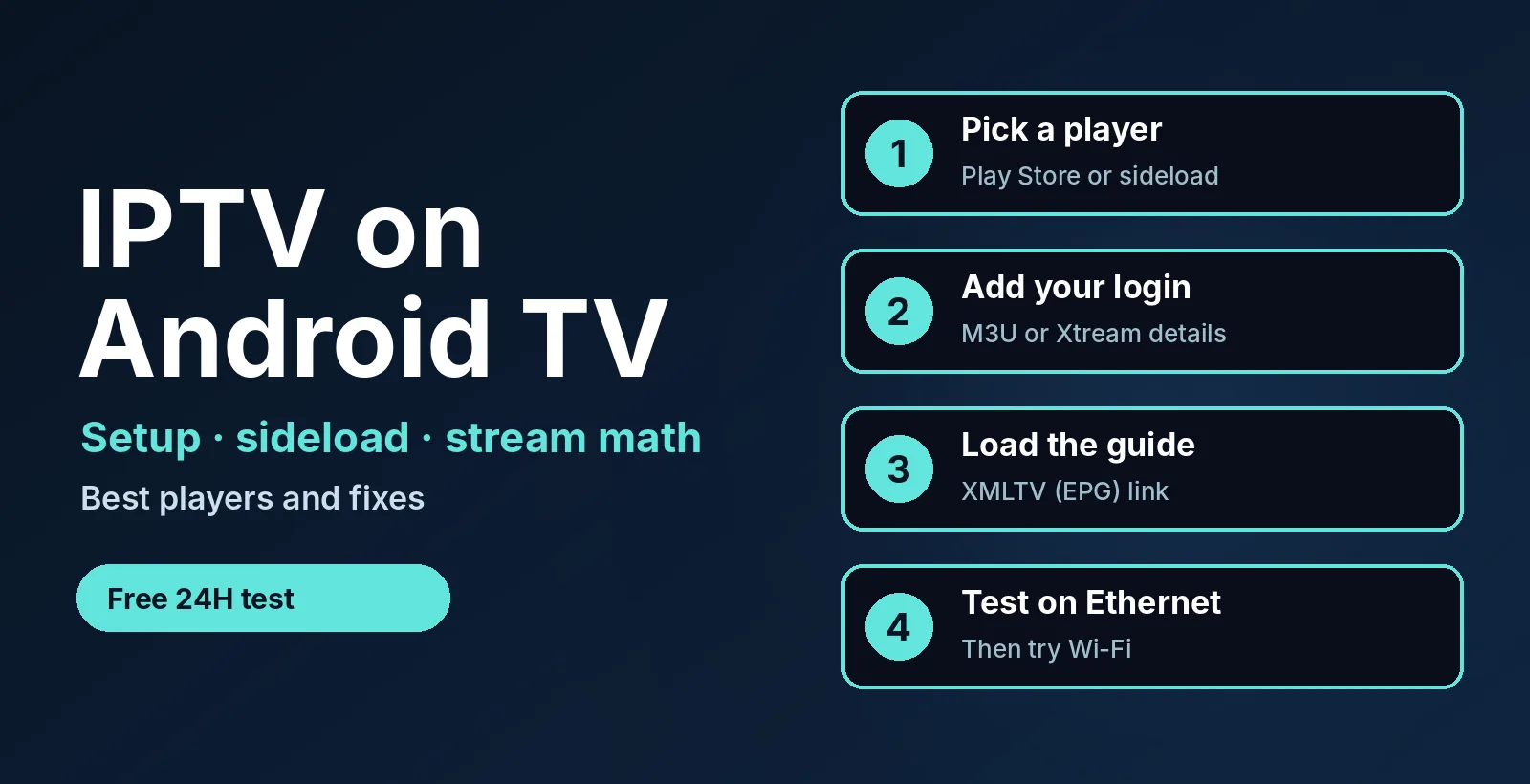
Want IPTV on Android TV that works first time? Get a free 24-hour test login with an M3U link, Xtream details and a guide link. No credit card. See plans from $14/month →
- You need: a player app plus an Xtream login or an M3U link.
- Time: about 5 minutes with the login ready.
- Same on: Android TV, Google TV, Nvidia Shield and most Android TV boxes.
- Biggest hidden limit: your internet speed. 50 Mbps carries only one 4K stream at a time with 25% to spare.
1. What Is IPTV on Android TV?
IPTV on Android TV means watching live channels, movies and series through an IPTV player app installed on an Android TV or Google TV device. The app is the player. Your provider supplies the content as an Xtream Codes login or an M3U playlist link.
Android TV runs on TVs from several brands, on Nvidia Shield and on many small boxes. That makes IPTV on Android TV one of the most flexible setups, because the Google Play Store has TV-ready players. If you use a stick instead, read IPTV on Firestick. If you want the box hardware guide, see best IPTV box.
2. How to Download IPTV on Android TV in 5 Steps
- Connect the device to your network. Use an Ethernet cable if the device has a port. It is the quickest way to rule out Wi-Fi problems.
- Install a player. Open the Google Play Store on the TV, search for TiviMate, IPTV Smarters Pro or XCIPTV and press Install.
- Add your login. Choose Xtream Codes and enter the server address, username and password, or paste your M3U link if the app asks for a playlist.
- Add the guide. Paste the XMLTV (EPG) link if your provider gave you one. Channels still play without it, but the schedule stays empty.
- Wait for the sync. Large lists need a minute to load channels, logos and the guide. Then open a channel and test it.
If the list stays empty, jump to section 9 or read IPTV M3U not working. For the file basics, see our M3U playlist guide.
3. What Is the Best IPTV Player for Android TV?
There is no single best IPTV player for Android TV. The right one depends on how you log in and how much control you want. These three are common choices, and each has a full guide on this site.
| Player | Best for | Guide |
|---|---|---|
| TiviMate | A cable-box style layout with a strong guide and remote-friendly menus | TiviMate setup |
| IPTV Smarters Pro | Fast Xtream Codes login for live TV, movies and series | Smarters Pro setup |
| XCIPTV | Android devices where you want a simple Xtream or M3U player | XCIPTV setup |
Compare more options in best IPTV player apps, or read our Televizo setup guide for a free Android player that accepts Xtream Codes and M3U. If your provider uses a Stalker portal, see the OTT Navigator setup guide. Do not install several players at once and log in on all of them, because every open player can use one of your connections.
Need an Xtream login or M3U link for IPTV on Android TV? Ask for a free 24-hour login and we send the details.
4. Sideload an App That Is Not in the Play Store
Some players are not listed for your TV in the Play Store. You can install them from an APK file, which is called sideloading. Use only apps from sources you trust.
- Install a file-downloader app such as Downloader from the Play Store.
- Open Settings > Device Preferences > About, scroll to the build entry and press OK seven times to turn on developer options.
- Go to Settings > Device Preferences > Security & restrictions (the path varies by brand) and allow installs from unknown sources for the downloader app only.
- Open the downloader, enter the app’s official download address, install it and turn the unknown-sources switch off again.
Menu names change between brands and Android versions, so use Google’s Android TV help if your screen looks different.
5. Stream Math: How Many 4K Streams Can You Run?
Most guides to IPTV on Android TV skip the bandwidth numbers. A 4K IPTV channel often needs about 20 Mbps, and an HD channel about 4 Mbps. Keep 25% of your speed free for other devices and Wi-Fi dips. The formula is: speed x 0.75, divided by the stream bitrate, rounded down.
| Internet speed | Usable (75%) | HD streams (4 Mbps) | 4K streams (20 Mbps) |
|---|---|---|---|
| 25 Mbps | 18.75 Mbps | 4 | 0 |
| 50 Mbps | 37.5 Mbps | 9 | 1 |
| 100 Mbps | 75 Mbps | 18 | 3 |
| 300 Mbps | 225 Mbps | 56 | 11 |
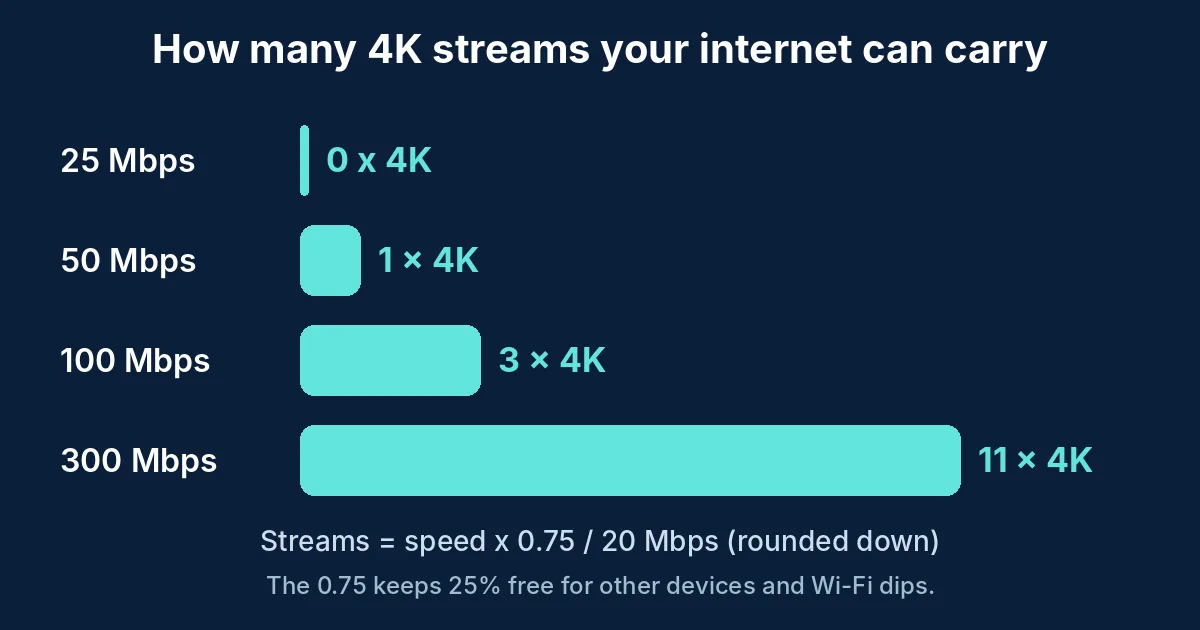
The surprise is the 25 Mbps row: it fits four HD streams but not one 4K stream with a safe margin. If your plan is on 4K channels, check the speed first. More detail is in our IPTV 4K guide.
6. Ethernet or Wi-Fi on an Android TV Box
Many budget Android TV boxes have a 100 Mbps Ethernet port and only basic Wi-Fi. A 100 Mbps port is still enough for one 4K stream, but it caps the box well below a fast home connection. Wi-Fi speed also drops with distance and walls, so test the same channel on a cable and on Wi-Fi. If the cable is smooth and Wi-Fi is not, the problem is your wireless signal, not the player or the playlist.
7. Android TV or Google TV: Is There a Difference?
For IPTV, no. Google TV is a newer home screen that runs on top of Android TV, and the same player apps work on both. The difference you may notice is that Google TV pushes recommendations on the home screen. The setup steps in this guide are the same on either.
8. Is IPTV Legal in the USA?
IPTV technology is legal. What matters is whether the channels you watch are licensed for you and whether the source is authorized. Use only playlists you are allowed to watch, and avoid unofficial add-ons that promise everything for free. Our IPTV legality guide explains what to check. This is general information, not legal advice.
9. Why IPTV on Android TV Is Not Working
| Symptom | Likely cause | Fix |
|---|---|---|
| Login fails or the list is empty | Typo in server, username or password, or an expired login | Re-enter the details with no spaces; ask your provider to check the account |
| Channels load, guide is empty | No guide link or IDs do not match | Add the XMLTV link; refresh the guide in the app |
| Plays, then stops | Login used on too many devices | Close other players and other TVs on the same login |
| Buffering or freezing | Weak Wi-Fi or not enough speed | Use Ethernet; check the stream math above |
| App crashes or lags | Full storage or an old app version | Clear the app cache; update the app; free up storage |
| App will not install | Not offered for your device or unknown sources off | Check the sideload steps in section 4 |
More fixes that apply to every device are in IPTV not working: 7 fixes.
10. Free and Open-Source IPTV Players
Yes, open-source IPTV players for Android TV exist. One example is StreamVault on GitHub, a free player built for Android TV. Read the project page, its license and its reviews before you install any app. A free player still needs a playlist or login from a provider, so a free app is not the same as free channels. Our guide to free IPTV apps vs free trials explains the difference. Kodi is another free option, covered in IPTV on Kodi.
11. A 24-Hour Test Plan for IPTV on Android TV
- Right away: the login works and the channel list loads in under a minute.
- Same hour: the guide fills in and your must-have channels play.
- Evening peak: watch one live channel for 30 minutes on Ethernet, then on Wi-Fi.
- Two screens: open two channels at once to test the connection limit.
- Before it ends: message support and see how fast a person replies.
The full checklist is in our IPTV free trial guide.
Using more than one device at home? Compare apps in our IPTV players by device guide.
12. Frequently Asked Questions
How do I download IPTV on Android TV?
Open the Google Play Store on your TV, install an IPTV player such as TiviMate, IPTV Smarters Pro or XCIPTV, then enter your provider’s Xtream login or M3U link. If the app is not listed, sideload it with a downloader app.
What is the best IPTV player for Android TV?
It depends on your login type and layout preference. TiviMate suits a cable-box style layout, IPTV Smarters Pro suits quick Xtream logins, and XCIPTV is a simple Xtream or M3U player.
Can I put IPTV on my smart TV?
Yes, if the TV runs Android TV or Google TV, install a player from the Play Store. Other smart TV brands use different app stores, so check IPTV on Smart TV.
Is there an open-source IPTV player for Android TV?
Yes. StreamVault is one open-source example on GitHub. Check its license and reviews first, and remember that you still need your own playlist or login.
Is IPTV legal in the USA?
The technology is legal. Legality depends on whether the content is licensed and the source is authorized, so use only playlists you are allowed to watch.
Does IPTV work on mobile?
Yes. Most IPTV players have Android and iPhone versions, and you can use the same login. See IPTV on iPhone for the phone steps.
Why is IPTV buffering on my Android TV box?
The usual causes are weak Wi-Fi, too little internet speed for 4K, or too many devices on one login. Try Ethernet and check the stream math table.
13. Conclusion
IPTV on Android TV takes five minutes: install a player, enter your Xtream login or M3U link, add the guide and test on a cable. Check your internet speed against the stream math before you blame the app. Start your free 24-hour trial, then compare plans from $14/month. For more, read the IPTV subscription guide and IPTV on VLC.
Ready to try IPTV on Android TV? Message us for your free 24-hour login.
Start your free 24h trial
No credit card. We reply with your trial login.